
Python For Loop Statement
Python Loops
A loop statement allows us to execute a statement or group of statements multiple times.
Python has two primitive loop commands:
For Loop
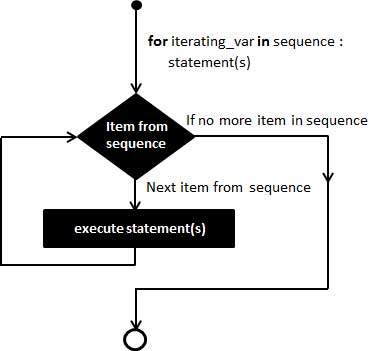
Syntax:
for iterating_var in sequence:
    statements(s)
# Program to print the fruits available inside the list
fruits = ["Apple", "Banana", "Cherry","Mango","Pineapple","Jackfruit"]

for x in fruits:
    print(x)

Output:
Apple
Banana
Cherry
Mango
Pineapple
Jackfruit
# Program to print the numbers available inside the list
numbers = [0, 1, 5, 10, 15, 45, 50]

for i in numbers:
    print(i)

Output:
0
1
5
10
15
45
50
Using else Statement with Loops
If the else statement is used with a for loop, the else statement is executed when the loop has exhausted iterating the list.
# Program to print the numbers available inside the list using else statement
numbers = [0, 1, 5, 10, 15, 45, 50]

for i in numbers:
    print(i)
else:
    print("No items left")

Output:
0
1
5
10
15
45
50
No items left
# Program to find the sum of all numbers stored in a list

# List of numbers
numbers = [0, 1, 5, 10, 15, 45, 50]

# variable to store the sum
sum = 0

# iterate over the list
for val in numbers:
    sum = sum + val

print("The sum of numbers in the list is", sum)

Output:
The sum of numbers in the list is 126
Looping Through a String
# Program to print each character of a string
for x in "banana":
    print(x)

Output:
b
a
n
a
n
a
The range() function
# Program to generate 10 numbers starting from 0 to 9 using Range Function
print(range(10))

Output:
range(0, 10)
# Program to display the numbers using Range Function
for x in range(10):
    print(x)

Output:
0
1
2
3
4
5
6
7
8
9
# Program to display the numbers between 2 values using Range Function
for x in range(2,6):
    print(x)

Output:
2
3
4
5
# Program to display the numbers between 2 values using step size
for x in range(1, 30, 2):
    print(x)

Output:
1
3
5
7
9
11
13
15
17
19
21
23
25
27
29
Iterating by Sequence Index
An alternative way of iterating through each item is by index offset into the sequence itself.
# Program to iterate through a list using indexing
fruits = ["Apple", "Banana", "Cherry","Mango","Pineapple","Jackfruit"]

for index in range(len(fruits)):
    print ('Fruit name is :', fruits[index])

Output:
Fruit name is : Apple
Fruit name is : Banana
Fruit name is : Cherry
Fruit name is : Mango
Fruit name is : Pineapple
Fruit name is : Jackfruit
# A list of fruits
fruits = ["Apple", "Banana", "Cherry","Mango","Pineapple","Jackfruit"]

## Read fruits list and enumerate into index and value
# Enumerate() method adds a counter to an iterable and

returns it in a form of enumerate object.
for index,value in enumerate(fruits):
    print(index,value)
#  print ('Fruit Index is',index,'and Fruit name is :',value)

Output:
0 Apple
1 Banana
2 Cherry
3 Mango
4 Pineapple
5 Jackfruit
Nested For Loop
Python programming language allows to use one for loop inside another for loop.
# Nested for loop example
for x in range(1,4):  # 1 ,2, 3
    ### Inner for loop	 ###
    for y in range(1,4):
        print(x,y)

Output:
1 1
1 2
1 3
2 1
2 2
2 3
3 1
3 2
3 3
# Nested for loop example
adj = ["red", "big", "tasty"]
fruits = ["apple", "mango", "banana"]

for x in adj:
    for y in fruits:
        print(x, y)

Output:
red apple
red mango
red banana
big apple
big mango
big banana
tasty apple
tasty mango
tasty banana